How CC/BCC Affects Email Deliverability And Spam Filters
It's not just what you write that matters for getting your email to the right place. How you send each word is also important. How you use Cc and Bcc is very important for how email systems see your messages. Spam filters are careful when messages look like they have a lot of people in them or are too general. Using Cc and Bcc wisely, on the other hand, builds trust and keeps the recipient's information safe. In fact, little things you do in these areas can mean the difference between your email going to the inbox and going to spam. This knowledge will help you speak clearly, professionally, and with confidence.
CC and BCC - Using Guide and Tips
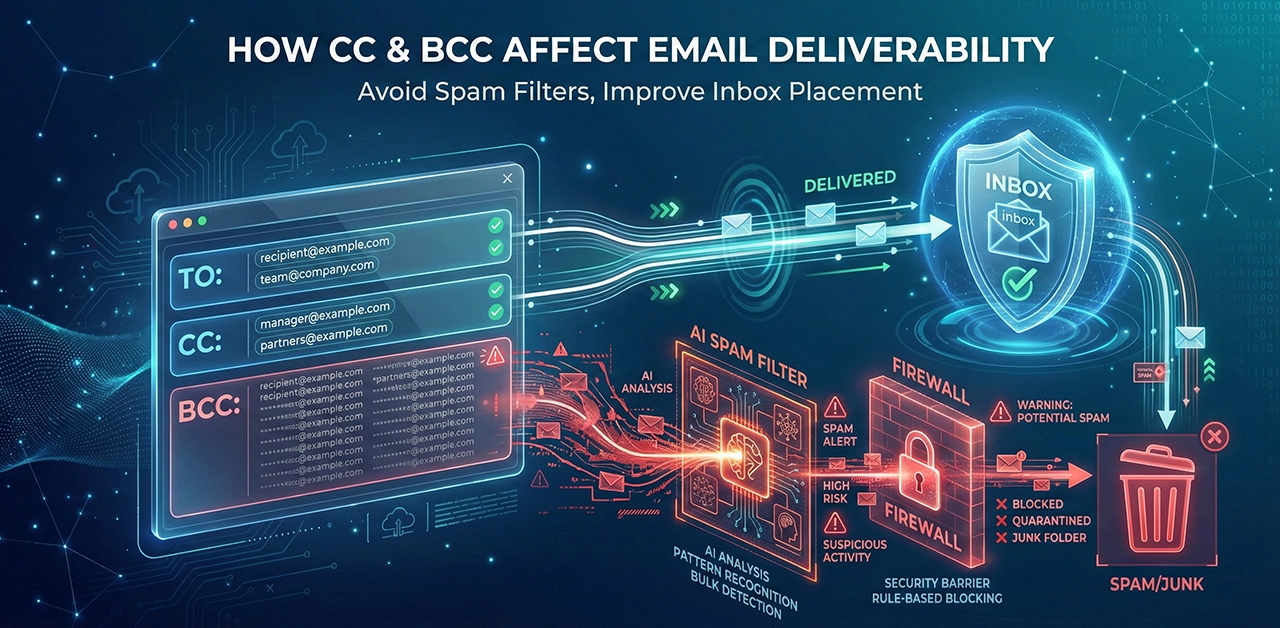
How you use Cc and Bcc can change how quickly your emails get delivered and how spam filters treat them. Your email might look like bulk mail if you add too many people to the CC line. It can cause spam filters to go off. Bcc is better for big groups because it keeps the people who get the email private.
But sending emails with hundreds of Bcc recipients can still set off spam alerts. Don't use Cc or Bcc more than you need to, and always check email names. Make your emails personal if you can. People are more likely to open and read your emails if they have useful information. It makes returns less likely.
Does Using Bcc Help Reduce Spam?
Yes, Bcc can help with junk mail. BCC hides the names of everyone except the person who sent the email when you send it to a lot of people. This stops scammers from getting emails from a public list. It also stops "Reply All" loops that can make inboxes messy and cause problems. For instance, Bcc is often used in group messages or newsletters to protect the privacy of the people who get them.
But Bcc doesn't stop all kinds of spam, like phishing emails. You still need to be careful with links and follow safe email habits to stay safe. Bcc is a simple but helpful way to keep the email addresses of the people you send it to safe while still keeping the conversation professional. It's actually a small step that adds security and keeps your email from being seen by as many people. Using Bcc correctly will make sure that your emails are safe and polite.
Best Practices For Cc/Bcc To Improve Deliverability
If you use Cc and Bcc correctly, your emails will get delivered more often and still look professional. To keep things neat and make sure your email doesn't get marked as junk. Use Bcc to protect people's privacy and keep "Reply All" chains short in big groups. This way, only the person who sent the email can see who it is going to. Don't use either option too often, or spam filters might go off because too many people are getting the message.
Always double-check email addresses to make sure they are correct. Try to make your content more personal if you can. People are less likely to ignore or bounce emails that have useful information in them. If you keep your receiver lists clean and well-managed, more people will actually respond to your messages.
Technical Tips To Avoid Spam Flags
To make sure your emails get delivered, you need to stay away from spam flags. At first, only use sender addresses and domains that have been verified by SPF, DKIM, and DMARC records.
After you follow these technical steps, email systems will know that your messages are real. Spam filters often go off for emails that are written in all caps or that don't make sense or aren't important. Don't send too many files or links, and don't copy or blind copy too many people.
You should also keep your email lists clean by getting rid of addresses that are no longer valid or have bounced back. People are less likely to mark personalized emails as spam than general bulk emails. Keeping an eye on how many people open and click on your emails. It helps you find problems with deliverability early on.
Is It Unprofessional To Bcc In an Email?
Using Bcc isn't always unprofessional. It's helpful for sending a message to a group of people without letting them see each other's email addresses. Be careful when you use Bcc at work. For example, Bcc is often used for company newsletters or announcements.
What Happens If Someone Replies To A Bcc Email?
If someone replies to an email that they were BCC'd on, only the person who sent the email will see the reply. People who are added to Bcc won't see the message because it is hidden from them. This keeps addresses safe and stops people from accidentally replying to everyone. Can you reply when BCC? Here is a detailed discussion.
How To Bcc Email In Outlook?
To Bcc in Outlook, open a new email. Press "Options" and then "Bcc." After that, type in the addresses you want to keep secret. Send your message the way you usually do. BCC is a good way to protect data in mass emails or newsletters.
Can A Firewall Detect Bcc In Emails?
Can A Firewall Detect Bcc In Emails? A firewall can't find Bcc receivers, no. Firewalls don't really care about email headers. Servers only see Bcc names, but security systems look for spam and harmful files. Keep in mind that Bcc hides the email addresses of the people you send it to from each other, but the sender can still see the email address.
Final Verdict
In short, the Cc and Bcc lines of a message have a direct effect on how email systems judge it. Too much use of "Cc" can make emails feel less personal and more crowded. It could make spam filters turn on. BCC is good for privacy, but very big hidden lists can still be a problem. That's why it's important to find a balance.